Hi readers,
Thank you for your emails.I received 80 emails yesterday.
I appreciate it.
Here is the top 4 IDE for both .Net and Java Developers:
No1 Visual Studio 2008(Pro and Team Editions) from Microsoft.com
Why No1? Because all is visual (windows& web apps) and it has robust
framework behind it.
No2 Netbeans IDE from Netbeans.org(Java,C++,Ruby,PHP,Python..)
It has all except the visual part is missing except Swing(Java)
No3 Eclipse IDE(Java) from eclipse.org
No4 Aptana Studio (Java,PHP,Ruby,Perl) from aptana.com
There are still good IDE out there but these are the top one.
Thank you for reading.
Talley Ouro
johnstalley@live.com
Friday, August 28, 2009


Do you know which version of AJAX Toolkit to use for VS2005?
Hi readers,
Thank you for your emails.I appreciate it.
If you have Visual Studio 2005 and wonder which version of Ajax ToolKit
to use then i have the answer.
The version to use is 20229
You can download it directly on my downlaod page HERE
If you are having problem clik HERE
That`s all i want to share with you today.
Thank you for visiting my blog!
Talley Ouro
johnstalley@live.com
Raleigh,NC.
Thank you for your emails.I appreciate it.
If you have Visual Studio 2005 and wonder which version of Ajax ToolKit
to use then i have the answer.
The version to use is 20229
You can download it directly on my downlaod page HERE
If you are having problem clik HERE
That`s all i want to share with you today.
Thank you for visiting my blog!
Talley Ouro
johnstalley@live.com
Raleigh,NC.
Sunday, August 23, 2009
XScheduler will be release end September 2009 easten time.
XScheduler is an Advanced Document Management System,
Business Process System,Employee Task Management,Active
Directory Manager,Government Ressource Planning(GRP)
and more to come.
I published some screenshots from the program but these
screenshots are 1/200 of the screeshots and will be update
every friday.Thank you for reading and see you soon!
Talley Ouro,
Project Manager and Administrator
Cary,NC USA
How to get the current Primary Key from GridView(ASP.NET 2.0/3.5)?
Hi Readers,
Thank you for your emails .I am very grateful to your emails.They help me
post more blogs even i am very busy debug codes.
Take a good look at this grid:

What if i want to update Documents table with this statement:
Update Documents SET Status='Active' WHERE DocumentID=Current selected row on gridview!!!!(Remember Document is a SQL Keyword)
Here are the easy way to do it(VB.NET):
Step1: fire RowCommand event from Gridview( ex GridView1_RowCommand ...Handles GridView1.RowCommand)
Step2: Use CommandName and CommandArgument properties
Ex commandname are :Edit,Update,Delete,Insert....
commandargument is used to find the primary key of currently select item on gridview
Here is the code within GridView1_RowCommand :
Protected Sub GridView1_RowCommand(ByVal sender As Object, ByVal e As System.Web.UI.WebControls.GridViewCommandEventArgs) Handles GridView1.RowCommand
Dim itm As Integer
If e.CommandName.Equals("Edit") Then
itm = Convert.ToInt32(e.CommandArgument) REM get primary key of selected row on gridview
UpdateStatus(itm)
REM your code goes here.Update() is a function with parameter named itm.
It goals is to update Documents table based on selected row on the grid.
End If
End Sub
That`s all i want to share with you today.
Any question or if you want private training a lower cost please send
me email at johnstalley@live.com
Thanks
Talley Ouro
.Net Developer(VB.NET,C#,PHP,ASP.NET 2.0/3.5)
Thank you for your emails .I am very grateful to your emails.They help me
post more blogs even i am very busy debug codes.
Take a good look at this grid:

What if i want to update Documents table with this statement:
Update Documents SET Status='Active' WHERE DocumentID=Current selected row on gridview!!!!(Remember Document is a SQL Keyword)
Here are the easy way to do it(VB.NET):
Step1: fire RowCommand event from Gridview( ex GridView1_RowCommand ...Handles GridView1.RowCommand)
Step2: Use CommandName and CommandArgument properties
Ex commandname are :Edit,Update,Delete,Insert....
commandargument is used to find the primary key of currently select item on gridview
Here is the code within GridView1_RowCommand :
Protected Sub GridView1_RowCommand(ByVal sender As Object, ByVal e As System.Web.UI.WebControls.GridViewCommandEventArgs) Handles GridView1.RowCommand
Dim itm As Integer
If e.CommandName.Equals("Edit") Then
itm = Convert.ToInt32(e.CommandArgument) REM get primary key of selected row on gridview
UpdateStatus(itm)
REM your code goes here.Update() is a function with parameter named itm.
It goals is to update Documents table based on selected row on the grid.
End If
End Sub
That`s all i want to share with you today.
Any question or if you want private training a lower cost please send
me email at johnstalley@live.com
Thanks
Talley Ouro
.Net Developer(VB.NET,C#,PHP,ASP.NET 2.0/3.5)
Saturday, August 22, 2009
Introduction to Windows Live Cloud Services
Hi readers,
All IT compagnies are moving from traditional computer systems into cloud computing.
The good news is Microsoft invested a lot into it.
As a programmer and a member of MSDN network i invested myself into this too.
I am working on a Business Process/Workflow program which will be published soon on sourceforge.net and i need a chat control for the chart section of my project.I created a C# class library project which has all the functionality i needed for chat purposes.But i need something quick and fast.I have 1000 lines of code to review .So i checked Windows Live Services and i found a control that fit my need.
Here is a link to live service: link
To get started with Windows Live Controls(work both with VS 2005/2005) i precompile required bin on my download page .Copy Live Chat Bin here
Here are the steps:
Step1: Unzip Live Chat Bin and copy them into the bin section of your web project.
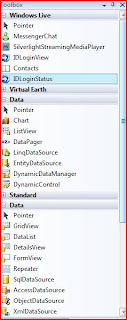
Step2: Open toolbox window from VS ,add a new tab and select choose items.Locate the ddl from step1 and click ok .You should see something like this:
All IT compagnies are moving from traditional computer systems into cloud computing.
The good news is Microsoft invested a lot into it.
As a programmer and a member of MSDN network i invested myself into this too.
I am working on a Business Process/Workflow program which will be published soon on sourceforge.net and i need a chat control for the chart section of my project.I created a C# class library project which has all the functionality i needed for chat purposes.But i need something quick and fast.I have 1000 lines of code to review .So i checked Windows Live Services and i found a control that fit my need.
Here is a link to live service: link
To get started with Windows Live Controls(work both with VS 2005/2005) i precompile required bin on my download page .Copy Live Chat Bin here
Here are the steps:
Step1: Unzip Live Chat Bin and copy them into the bin section of your web project.
Step2: Open toolbox window from VS ,add a new tab and select choose items.Locate the ddl from step1 and click ok .You should see something like this:

Step 3:Drag any control from the list( i picked MessengerChat in my case).
NB :Remember to set PrivacyStatementUrl in order for MessengerChat to work properly.
The output shoud look like this after you run the browser:

Thursday, August 20, 2009
How to bind XML Data to GridView or DataGrid?
Hi Readers,
Thank you for reading my blog.I received 40 emails yesterday.
Here is how to bind xml data to GridView or DataGrid:
Download aspnetbooks.xml source code here
Step 1:
-Add reference to System.Data and System.XML
In VB.NET :
imports System.Data
imports System.Xml
In C# :
using System.Data;
using System.Xml;
Step2:
-Drop a GridView or DataGrid on designer surface
-Double click on designer for Page_Load event
Step3:Add this code inside Page_Load
In VB.NET :
Dim ds As New DataSet
Dim XMLMode As New System.Data.XmlReadMode
ds.ReadXml(GetXMLPath("Demos/aspnetbooks.xml"))
Me.GridView1.DataSource = ds
Me.GridView1.DataBind()
I programmed GetXMLPath function which is:
Protected Function GetXMLPath(ByVal xmlpath As String) As String
Return Request.PhysicalApplicationPath & xmlpath
End Function
In C#:
DataSet ds=new DataSet();
System.Data.XmlReadMode XMLMode=new System.Data.XmlReadMode();
ds.ReadXml(GetXMLPath("Demos/aspnetbooks.xml"))
this.GridView1.DataSource = ds
this.GridView1.DataBind()
for the function:
protected string GetXMLPath(string xmlpath)
{
return Request.PhysicalApplicationPath + xmlpath
}
Note + sign instead of & inside GetXMLPath method(C# uses + while VB.NET uses &)
The code inside VS should look like this:

The output should look like this:

Thank you for reading.
Any question or if you need private online training please email me at
johnstalley@live.com
Talley Ouro
Raleigh,NC
Thank you for reading my blog.I received 40 emails yesterday.
Here is how to bind xml data to GridView or DataGrid:
Download aspnetbooks.xml source code here
Step 1:
-Add reference to System.Data and System.XML
In VB.NET :
imports System.Data
imports System.Xml
In C# :
using System.Data;
using System.Xml;
Step2:
-Drop a GridView or DataGrid on designer surface
-Double click on designer for Page_Load event
Step3:Add this code inside Page_Load
In VB.NET :
Dim ds As New DataSet
Dim XMLMode As New System.Data.XmlReadMode
ds.ReadXml(GetXMLPath("Demos/aspnetbooks.xml"))
Me.GridView1.DataSource = ds
Me.GridView1.DataBind()
I programmed GetXMLPath function which is:
Protected Function GetXMLPath(ByVal xmlpath As String) As String
Return Request.PhysicalApplicationPath & xmlpath
End Function
In C#:
DataSet ds=new DataSet();
System.Data.XmlReadMode XMLMode=new System.Data.XmlReadMode();
ds.ReadXml(GetXMLPath("Demos/aspnetbooks.xml"))
this.GridView1.DataSource = ds
this.GridView1.DataBind()
for the function:
protected string GetXMLPath(string xmlpath)
{
return Request.PhysicalApplicationPath + xmlpath
}
Note + sign instead of & inside GetXMLPath method(C# uses + while VB.NET uses &)
The code inside VS should look like this:

The output should look like this:

Thank you for reading.
Any question or if you need private online training please email me at
johnstalley@live.com
Talley Ouro
Raleigh,NC
Subscribe to:
Posts (Atom)
About Me

- TALLEY
- Raleigh, NC, United States
- I am a software developer based in Raleigh,NC,USA.I design softwares and systems ;i also do consulting for companies worldwide.I program with these languages:VB.NET 2003/2005/2008;C#;Java(fun),SQL(200,2005,2008);ASP.NET 2.0/3.5;ASP.NET AJAX;ASP.NET MVC;JavaScript;JQuery;Windows Workflow Foundation;Web Services.I have 4 years + in programming.
